

DSS Case Study: Implementing Nx for Shared Angular and NestJS Packages Across Multiple Projects
Learn how Nx monorepo improves Angular and NestJS with shared libraries, faster builds, dependency tracking and optimized CI/CD for scalable development.
How DSS integrated SonarQube with Azure DevOps and Kubernetes to automate code analysis, enforce quality gates and speed up CI/CD pipelines.
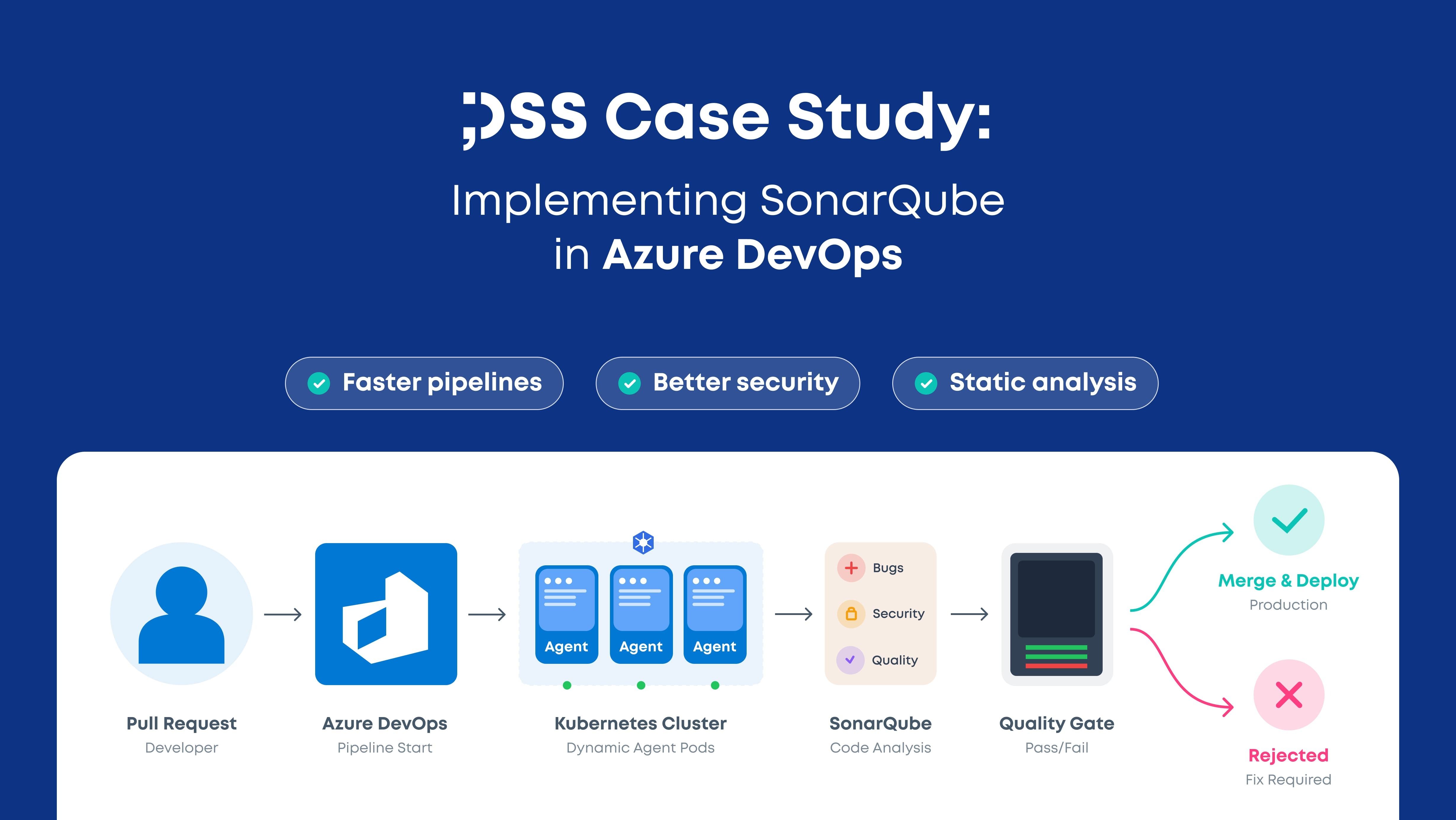
Ensuring high-quality code while maintaining development velocity is a challenge for any engineering team. At DSS, we aimed to improve our development workflow by integrating SonarQube into Azure DevOps, leveraging Kubernetes (k8s) for scalability and performance. This case study outlines how we set up SonarQube, created custom Azure DevOps agents within our Kubernetes infrastructure, integrated SonarQube with Azure DevOps, and optimized our pipelines to enhance software quality and deployment efficiency.
Before integrating SonarQube, our development process had several inefficiencies:
To address these challenges, we designed and implemented the following:
We deployed SonarQube in our Kubernetes cluster, ensuring scalability and efficient resource management. This setup allowed us to:
To improve performance and flexibility, we created custom Azure DevOps agents running as pods in our Kubernetes cluster. These agents:
The next step was integrating SonarQube with Azure DevOps to enable automated static code analysis and enforce quality gates. We:
We configured our Azure DevOps pipelines to run the following checks when a pull request (PR) is created:
This approach ensured that all potential issues were identified before merging, significantly improving our code quality and reducing post-merge errors.
By implementing this solution, we achieved the following improvements:
Integrating SonarQube with Azure DevOps and leveraging Kubernetes for dynamic build agents proved to be a game-changer for our development process. By shifting code analysis and testing earlier in the development lifecycle, we achieved faster builds, better code quality, and more reliable deployments.
SonarQube in Azure DevOps is a static code analysis integration that automatically scans code for bugs, vulnerabilities, and code smells during CI/CD pipelines. It helps development teams enforce quality standards before code is merged.
Integrating SonarQube with Azure DevOps allows teams to automate code quality checks, enforce quality gates, and detect issues early in the development lifecycle. This improves code reliability and reduces production errors.
Kubernetes enables dynamic scaling of Azure DevOps build agents by running them as pods. This allows CI/CD pipelines to run multiple builds in parallel and allocate resources based on demand.
SonarQube quality gates are predefined conditions that determine whether code meets quality and security standards. If the code fails the quality gate, it can block pull request merges or deployments.
Kubernetes provides scalable infrastructure for CI/CD workflows. It allows teams to run dynamic build agents, optimize resource usage, and improve pipeline performance.
By running SonarQube analysis and build agents inside Kubernetes, teams can parallelize workloads, reduce pipeline waiting times, and speed up code validation before deployment.
Learn how Nx monorepo improves Angular and NestJS with shared libraries, faster builds, dependency tracking and optimized CI/CD for scalable development.
DSS has implemented an optimised field service management process leveraging technologies such as ServiceNow and NowMobile.
We are eager to learn more about your company and your challenges. Write us more about your project, we are here to help you.
Contact usand we'll reach out to you within 24 hours
Hop on a meetingwith us to discuss your vision and goals
Get a dedicatedDSS team to work on your project
