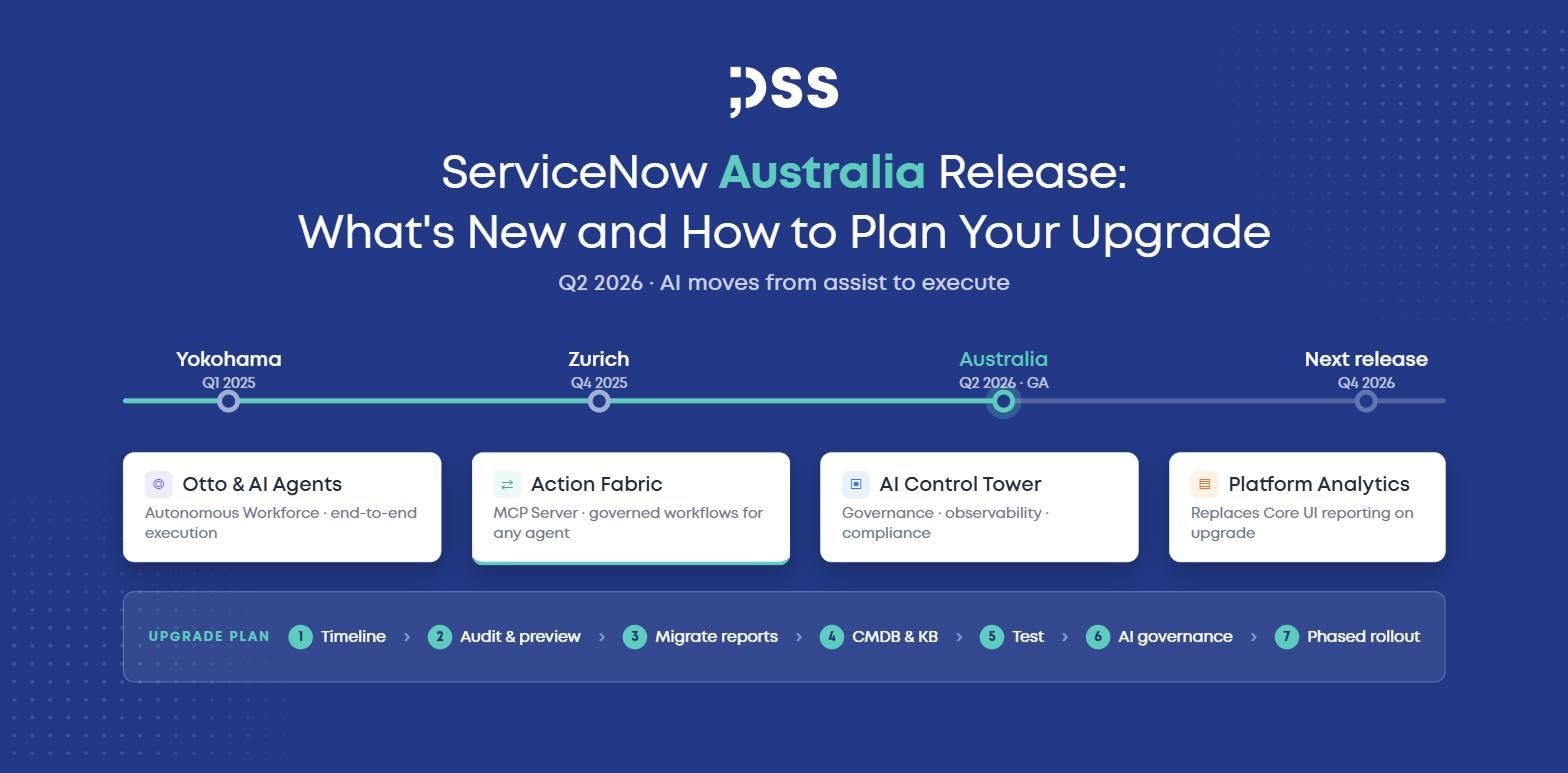
The ServiceNow Australia release is the platform's first country-named version and the second release under ServiceNow's new twice-a-year cadence. It reached general availability in May 2026 during Knowledge 2026 and, as of late summer, is already several patches deep. If Zurich was the release where AI agents started to act, Australia is the one where they are expected to execute work end to end, with governance, observability, and a faster data layer built around them.
This guide covers what is new in ServiceNow Australia, which changes will affect your instance on upgrade whether you activate the AI features or not, and how to plan a ServiceNow upgrade that does not turn into a firefight.
What Is the ServiceNow Australia Release?
ServiceNow has retired its city-based naming (Washington, Xanadu, Yokohama, Zurich) and moved to countries, starting with Australia. More importantly for platform owners, the release rhythm has settled into two family releases per year, landing in Q2 and Q4, instead of three. That sounds like less work, but each release now carries more change, and support cut-off dates for older families move earlier in the year. The planning window between "release is available" and "our current version loses support" is shorter than it used to be.
The strategic theme is consistent with everything ServiceNow has shipped since Now Assist: AI moves from assisting humans to completing tasks, and the platform adds the controls to make that safe.
What's New in ServiceNow Australia: Key Features
Otto and the Autonomous Workforce
Otto is the orchestration layer that lets AI agents govern, route, approve, and complete work rather than only summarize or suggest. Australia formalizes the idea of an "Autonomous Workforce": teams of AI specialists that collaborate across multiple steps of a process. If you have already experimented with building AI Agents in AI Agent Studio, Otto is what coordinates them at scale.
Action Fabric and the MCP Server
Arguably the most architecturally significant addition. Action Fabric exposes ServiceNow workflows, approvals, and business rules to any AI agent, whether built in ServiceNow or externally, through a generally available MCP (Model Context Protocol) Server. In practice, this means an external assistant can trigger a governed ServiceNow workflow without a custom integration. It also means your access model and approval design now matter for non-human identities, not just people.
AI Control Tower Expansion
With more agents executing work, governance stops being optional. AI Control Tower grows into the central layer for inventorying AI systems, tracking agent behaviour, and demonstrating compliance across the enterprise. For regulated industries in the EU, this is the piece that ties agentic AI to your existing risk and audit processes.
AI-Native Flow Designer
Flow Designer gains a native "Use an AI Agent" action: a flow can hand data to a configured agent and consume its structured output in later steps. Alongside it, Now Assist for Creator can draft an entire flow from a plain-language description, giving you an editable canvas in Workflow Studio in minutes. This is the fastest way to add AI into existing automations without rebuilding them.
L1 Service Desk AI Specialist
ServiceNow's first pre-built autonomous worker handles high-volume, low-judgment tickets such as password resets and access requests from start to finish. Its results depend entirely on the quality of your knowledge base and CMDB, which is why a knowledge audit belongs on the pre-activation checklist.
Platform Analytics Replaces Core UI Reporting
This one affects everyone. After upgrading to Australia, Platform Analytics is enabled by default: existing Core UI reports become unpublished, only admins can create Core UI analytics objects, and Analytics Hub redirects to KPI Details. If your teams still live in legacy dashboards, the Platform Analytics Migration Center should be part of your upgrade project, not an afterthought.
RaptorDB Performance and Data Foundations
RaptorDB Pro delivers faster query response and better handling of high-volume tables, a quiet but material improvement for large, data-heavy instances. In the same spirit, Australia continues the investment in CSDM 5.0 and CMDB quality, and Digital End-User Experience (DEX) adds bulk remediation across endpoints plus an Application Stability AI Agent.
How to Plan Your ServiceNow Australia Upgrade
An upgrade is a project, not a button. Here is the sequence we recommend.
- Know your timeline. Confirm which family and patch you are on, when its support ends under the new Q2/Q4 cadence, and whether you are skipping a release. Skipped releases mean cumulative changes and a longer test cycle.
- Audit customizations and skipped updates. Run Upgrade Preview, review skipped changes, and inventory scoped apps, custom scripts, and integrations that touch tables changed in Australia.
- Plan the Platform Analytics migration. List business-critical Core UI reports and dashboards, decide which to migrate and which to retire, and validate them in a sub-production instance before go-live.
- Get your data ready for AI. The L1 Specialist, Now Assist skills, and Otto all read from your CMDB and knowledge base. Clean up stale articles and check Discovery and Service Mapping coverage before activating anything autonomous.
- Test in isolation. Use a sub-production clone and, where available, Developer Sandboxes for team-level testing. A personal developer instance is useful for exploring new features early without touching client data.
- Define AI governance before activation. Decide who owns each agent, what it may execute, and how it is monitored in AI Control Tower. Review Action Fabric and MCP Server access as you would any new integration surface.
- Activate in phases. Upgrade the platform first, stabilize, then switch on AI capabilities one use case at a time with measurable success criteria. Confirm the licensing implications of each AI feature before it goes live.
Organizations that treat Australia as "upgrade plus governance plus data readiness" get the value. Those that activate everything on day one usually spend the next quarter cleaning up.
FAQ
When was the ServiceNow Australia release made generally available?
In May 2026, alongside Knowledge 2026. It is the first ServiceNow release named after a country rather than a city.
What is the biggest change in ServiceNow Australia?
The shift from AI assistance to AI execution: Otto orchestrates autonomous agents, and Action Fabric lets any AI agent trigger governed ServiceNow workflows through the MCP Server.
Will upgrading to Australia break my existing reports?
Platform Analytics is enabled by default after upgrade, existing Core UI reports become unpublished, and Analytics Hub redirects to KPI Details. Plan the migration before you upgrade.
How often does ServiceNow release new versions now?
Twice a year, in Q2 and Q4, starting with Zurich and Australia. Support cut-off dates move earlier accordingly, so upgrade planning needs to start sooner.
Do I need to activate the AI features to benefit from the upgrade?
No. RaptorDB performance, Platform Analytics, DEX improvements, and CMDB enhancements apply regardless. AI features can be enabled later, once governance and data readiness are in place.
How can DSS help with ServiceNow implementation?
DSS is an official ServiceNow partner offering consulting, implementation, and managed services. Our certified team plans and executes ServiceNow upgrades, migrates reporting to Platform Analytics, and sets up AI governance so you can adopt the Australia release with confidence.


