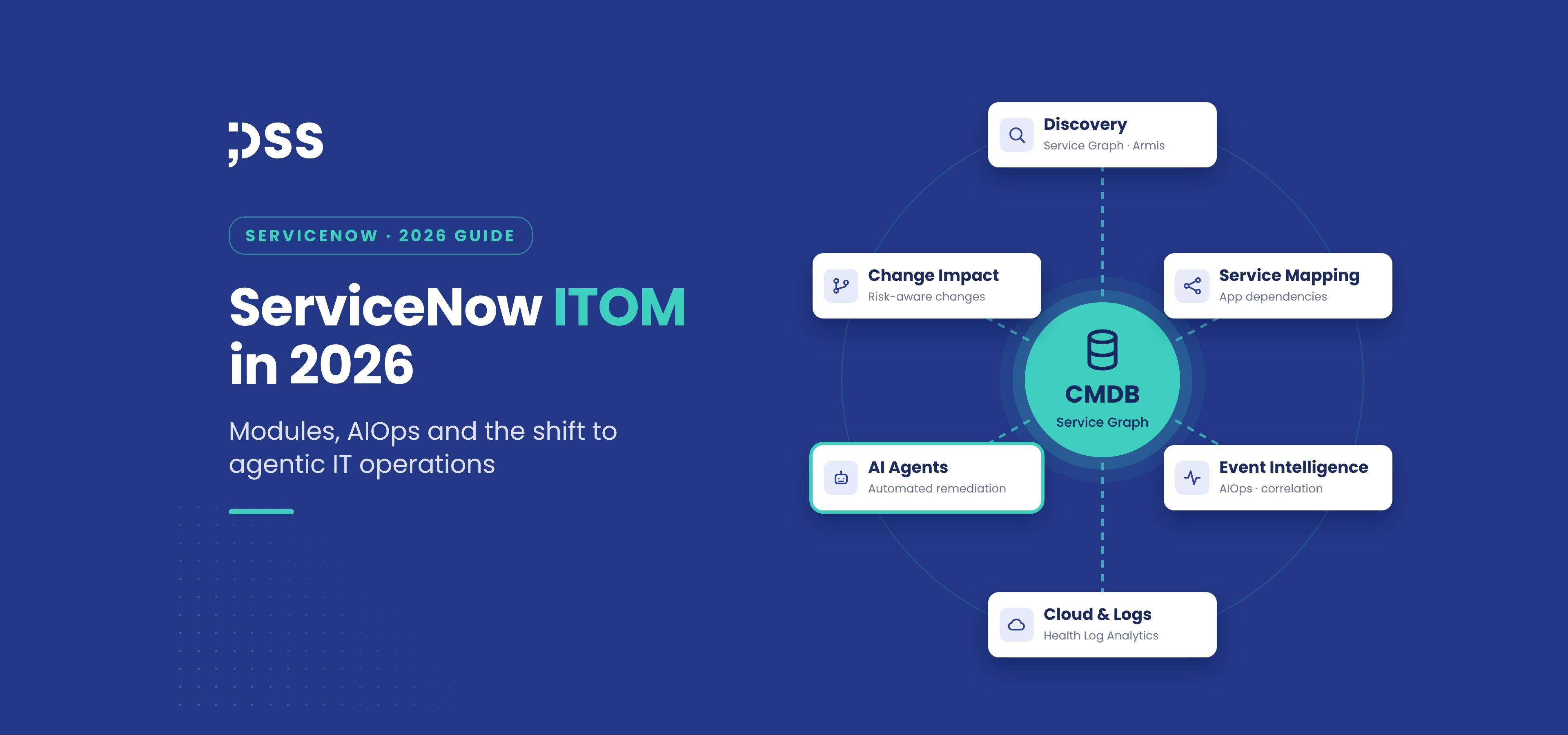
IT operations teams are under pressure from two directions at once. Hybrid infrastructure keeps growing across data centres, public clouds, containers and connected devices, while the business expects fewer outages and faster recovery with the same or smaller teams. ServiceNow ITOM (IT Operations Management) is the part of the ServiceNow AI Platform built to close that gap: it discovers what you run, maps how it supports business services, turns monitoring noise into actionable alerts and, increasingly, lets AI agents investigate and resolve issues.
2026 has been a turning point for the product line. The Australia release, the Armis acquisition and a steady stream of AIOps store updates have pushed ITOM from visibility and event management towards agentic IT operations. This guide explains the main ServiceNow ITOM modules, what has changed this year, how licensing works and how to approach implementation.
What is ServiceNow ITOM?
ServiceNow ITOM is a suite of applications that gives IT teams visibility into infrastructure and services, monitors their health and automates operational work. It sits on the same platform and data model as ITSM processes such as incident, problem and change, which is its main advantage over stand-alone monitoring tools: every alert, configuration item and automation runs against a shared CMDB, so operations data flows directly into service management.
In practice, ITOM answers three questions:
- What do we have? An accurate, continuously updated inventory of infrastructure, cloud resources and software in the CMDB.
- How does it support the business? Service maps that connect infrastructure to the applications and business services that depend on it.
- What is going wrong, and what should we do? Correlated alerts, anomaly detection, root-cause insight and automated remediation.
Core ServiceNow ITOM modules
Discovery and Service Graph Connectors
Main purpose: populate and maintain the CMDB. Discovery finds servers, network devices, cloud resources and software using agentless probes through a MID Server or the Agent Client Collector. Service Graph Connectors import trusted data from third-party sources such as cloud providers and endpoint management tools. TLS certificate management also builds on Discovery to track certificates before they expire.
Service Mapping
Main purpose: link infrastructure to business services. Service Mapping builds dynamic maps of the components behind each application, based on the Common Services Data Model. If you are deciding how far to go with each capability, our article on Discovery vs. Service Mapping and CMDB health covers the trade-offs, and our overview of CSDM 5.0 explains the data model that service maps rely on.
Event Management and Event Intelligence
Main purpose: reduce alert noise. Event Management ingests events from monitoring tools, de-duplicates and correlates them into alerts tied to configuration items and services. Event Intelligence adds machine learning for correlation and anomaly detection, so teams see a handful of meaningful alerts instead of thousands of raw events.
Metric Intelligence, Health Log Analytics and Synthetic Monitoring
Main purpose: detect issues before users report them. Metric Intelligence learns normal behaviour for time-series metrics and flags anomalies. Health Log Analytics applies machine learning to log streams, and its recent versions add OpenTelemetry ingest management and better mapping of host labels to CMDB items. Synthetic Monitoring tests the availability of key services from the outside in.
Cloud management and governance
Main purpose: keep cloud provisioning fast but controlled. Cloud capabilities provide self-service provisioning with guardrails, policy enforcement and visibility across AWS, Microsoft Azure and Google Cloud.
Change impact analysis and automated remediation
Main purpose: act on what operations data reveals. Because ITOM and ITSM share the CMDB, change requests can be checked against service maps and live health, and playbooks or AI agents can run remediation steps with approvals and full audit history.
What changed in ServiceNow ITOM in 2026
AIOps becomes agentic
The biggest shift is the move from AI that recommends to AI that acts. At Knowledge 2026 in May, ServiceNow introduced AI specialists for IT operations, AIOps, site reliability engineering and asset lifecycle as part of its Autonomous Workforce, all sharing the CMDB as their operational context. The same event launched ServiceNow Otto, a unified AI experience that combines Now Assist, Moveworks and AI Experience and will be extended across ServiceNow products over the coming year.
The September 2026 ITOM AIOps store release made this concrete. It added an Alert Verification AI Agent that can close alerts after checking related incidents and knowledge articles, an Integration Management Agent for conversational connector setup, and AI-assisted onboarding for common monitoring sources such as SolarWinds, SCOM, Zabbix, Nagios and vCenter. Crucially for governance, auto-closed alerts now show their reasoning and evidence with one-click reopen, and supervisors can monitor and intervene in agentic workflows step by step.
ITOM data opens up to external AI tools
The new ITOM MCP Server Console lets operations teams query alerts, CMDB relationships, AI models and service reliability data in natural language from external AI assistants, with each call authenticated, scoped to the user's roles and auditable. This follows the broader Action Fabric announcement, which lets external agents trigger governed ServiceNow workflows. For organisations already working on AI governance with AI Control Tower, these integrations should be brought under the same policies.
Asset visibility expands with Armis
ServiceNow completed its USD 7.75 billion acquisition of Armis in spring 2026. Armis provides continuous, agentless intelligence on IT, OT, IoT, medical and cloud assets, and its data flows into the CMDB. For ITOM teams this means far broader visibility of devices that traditional discovery struggles to reach, which strengthens both operations and security use cases.
A single starting point for AIOps setup
The AIOps Configuration Center in the Service Operations Workspace brings integrations, events and alerts, metrics, synthetics, services and dashboards into one hub, shortening the path from first integration to useful alerts. Teams planning their next upgrade can find wider release context in our Australia release upgrade guide.
How ServiceNow ITOM licensing works
ITOM is sold in packages that group capabilities by outcome, typically visibility (discovery and service mapping), health (event management and AIOps) and optimisation (cloud and cost governance), in different editions. Licensing is usually based on subscription units that reflect the number and type of resources you manage, rather than on named users. Because the mix of servers, cloud resources and containers changes constantly, it pays to model consumption before signing. Our article on ServiceNow license types explains how to compare options, and package details should always be confirmed with ServiceNow or your partner for your specific contract.
Implementation best practices
- Start with the CMDB, not the dashboards. AIOps and AI agents are only as good as the configuration data they reason over. Define ownership, identification rules and health targets first.
- Map critical services early. Prioritise the ten to twenty services whose outages hurt most, and map them before scaling Discovery everywhere.
- Integrate monitoring gradually. Connect your main monitoring tools, tune correlation and measure noise reduction before adding more sources.
- Introduce agents with supervision. Begin with recommendations and human approval, use the reasoning and audit features, then extend autonomy to well-understood alert types.
- Measure outcomes. Track mean time to detect and resolve, alert volume per service, CMDB completeness and the share of alerts handled automatically.
Teams that want to understand how agents are built and governed before rolling them out to operations can start with our ServiceNow AI agent tutorial.
FAQ
What does ITOM stand for in ServiceNow?
ITOM stands for IT Operations Management. It is the ServiceNow product line for discovering infrastructure, mapping services, managing events and alerts, monitoring health and automating operational tasks.
What is the difference between ServiceNow ITOM and ITSM?
ITSM manages IT services and requests through processes such as incident, problem, change and request management. ITOM provides the operational data and automation behind them: discovery, service maps, event correlation and remediation. Together they share one CMDB.
What are the main ServiceNow ITOM modules?
The core modules are Discovery and Service Graph Connectors, Service Mapping, Event Management with Event Intelligence, Metric Intelligence, Health Log Analytics, Synthetic Monitoring, cloud management and governance, and automated remediation.
What is AIOps in ServiceNow?
AIOps is the use of machine learning and AI agents to correlate events, detect anomalies, identify probable causes and resolve issues. In 2026 ServiceNow added AI agents that can verify and close alerts with visible reasoning and human supervision.
How is ServiceNow ITOM licensed?
ITOM is typically licensed in packages using subscription units based on the number and type of managed resources, rather than per user. Exact packages and ratios depend on your contract and should be confirmed with ServiceNow or a partner.
How can DSS help with ServiceNow implementation?
DSS is an official ServiceNow partner providing consulting, implementation and managed services. Our team helps organisations plan and deliver ITOM and CMDB projects, integrate monitoring tools, introduce AIOps and AI agents safely and keep the platform optimised after go-live.


